 DuoOnAir

DuoOnAir, an ON
AIR sign for iPhone Duo
Turn the outer screen of your iPhone Duo into a glowing On Air sign.
Stand it up in tent mode and let everyone know you're recording, in a meeting, or just busy.

Features
-
Fills the screen
Messages scale to fill the outer display, wrapping onto two or three lines when that makes them bigger, and stay centered clear of the camera.
-
Neon animations
Glow, Pulse, Breathe, Blink, or Neon Flicker, with a single faulty letter that stutters like a real tube. Speed is adjustable.
-
Your colors
Red, amber, green, blue, pink, white or any custom color. Solid, outline, or rainbow letters.
-
Seven typefaces
Classic, Rounded and Mono (SF Pro), Helvetica Neue, JetBrains Mono and Space Grotesk.
-
Backdrop
Add a faint background grid and a corner glow in the text color.
-
Stays on
The screen doesn't sleep while the sign is showing, so it stays lit for your whole call or recording.
-
Swipe to switch
Swipe left or right on the sign to move through the messages in a category without opening settings.
-
Accessible
Reduce Motion replaces flashing and pulsing with a steady sign, flicker stays under three flashes a second, and VoiceOver can read and change the message.
-
Dark or light
Choose light, dark or system appearance for settings. The sign itself is always black.
Who it's for
-
Remote workers
Let the people you live with know you're on a call or in a meeting, before they walk into frame.
-
Podcasters and streamers
A proper ON AIR or MIC LIVE light for the studio door, without buying one.
-
Video creators
Show RECORDING or QUIET PLEASE during a take, so nobody talks over it.
-
Open offices
FOCUS TIME or DO NOT DISTURB on the desk says it more politely than headphones.
See it in action
Ready-made messages
31 messages in three categories, plus your own text. Tap one to try it.
ON AIR
Work
Studio
Fun
Your own
How it works
- Open DuoOnAir and tap the sign to choose a message, color, font and animation.
- Fold your iPhone Duo into tent mode so the outer screen faces the room.
- The sign stays lit until you close the app.
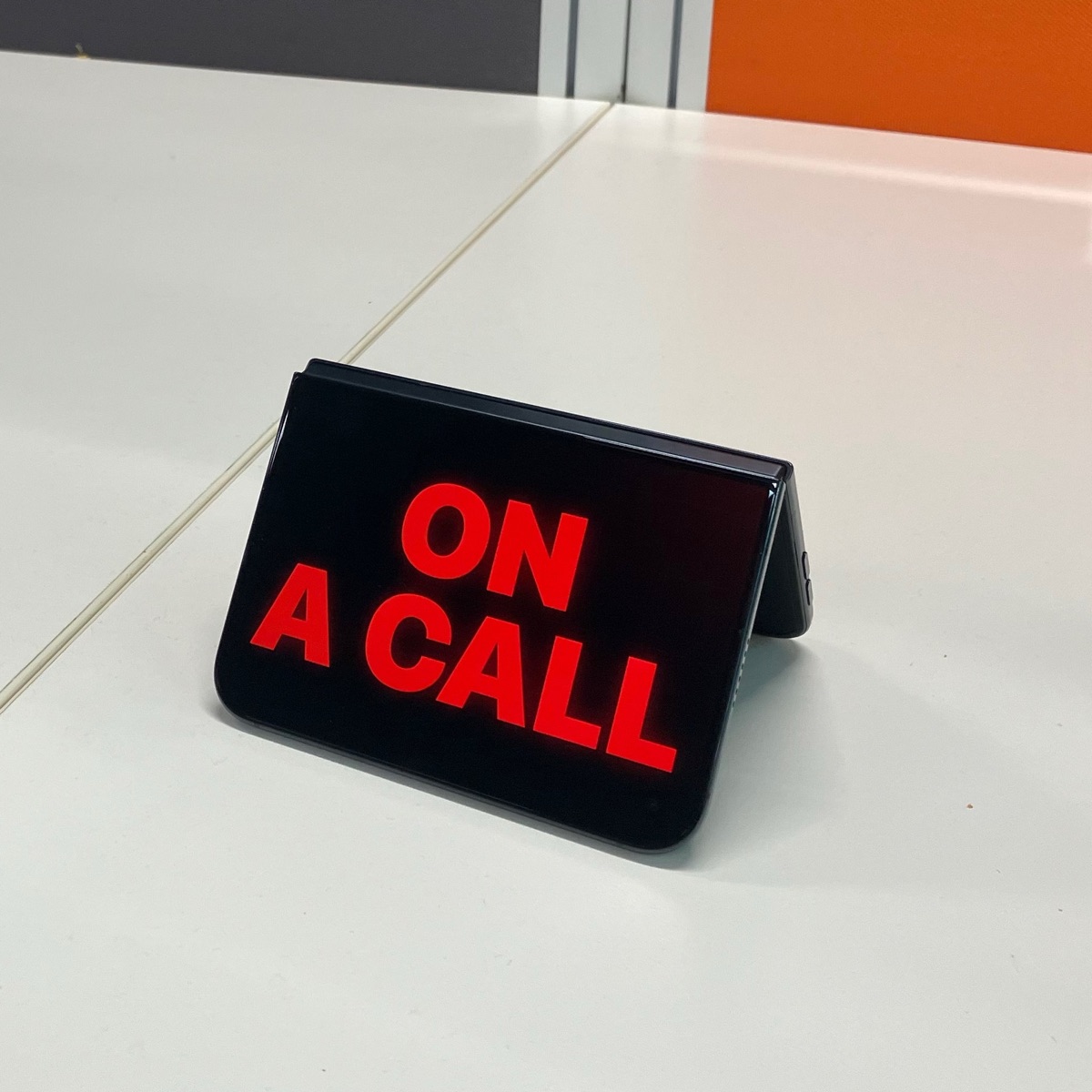
Made for tent mode
Fold your iPhone Duo into a tent and set it on your desk. The outer screen faces the room, so colleagues and family can see at a glance that you're on a call, in a meeting, or recording.
No stand, no extra hardware. Just the phone you already carry.
Support
Questions, feedback, or a problem with the app? Open an issue on the support page or email support@halans.dev.
DuoOnAir doesn't collect any personal data. Read the privacy policy.
Also made for iPhone Duo.
DuoFlex turns iPhone Duo into a waist-level viewfinder camera, to shoot from the hip, with the settings on one half of the folded inner display and the viewfinder on the other.